RESOURCES
9 Questions to Ask Before Purchasing Software for Your Spray Drone Business
How to evaluate Drone Software
Choosing the right software for your spray drone business is a big decision. The right platform can help you stay organized, save time, keep things running smoothly, ensure compliance, and help you grow. But with so many options, how do you know what to look for? Here are nine essential questions to ask—along with guidance on what to consider, how AcreConnect®
addresses each one, and a handy checklist at the end to help you compare your options.
1. How is my data stored and protected? Where? What kind of security practices do you follow?
Why it matters: You’ll be storing sensitive data—flight logs, customer records, chemical usage, and more. Look for software that uses encryption, secure authentication, and U.S.-based servers. Ask whether the provider has passed third-party security audits.
What to look for:
- U.S.-based data storage
- Encryption and secure authentication
- Multi-factor login options
- Proven track record of uptime and security
How AcreConnect®
helps:
AcreConnect®
stores all data securely on U.S.-based servers and has passed rigorous security audits by enterprise customers. We use Auth0 (an Okta technology) for secure user authentication, including multi-factor login and single sign-on. Our architecture ensures that customer data is isolated and protected. To date, we’ve had no unplanned downtime, surpassing industry standards.
2. What drones is this software integrated with?
Why it matters: The spray drone market is evolving fast. You may expand your fleet or switch brands. Your software should support multiple drone types to future-proof your investment.
What to look for:
- Compatibility with major drone brands (e.g., DJI, XAG, EAVision, Exedy)
- Ability to manage a mixed fleet
- Automatic syncing or easy import of flight logs
How AcreConnect® helps: AcreConnect® integrates with DJI, XAG, EAVision and Exedy drones, allowing you to automatically sync or upload flight logs. Flight logs can be used to generate application maps and FAA reports or simply stored as records on U.S. servers—no matter your fleet mix.
3. How reliable is the software? How quickly are bugs fixed? What kind of support is available?
Why it matters: Downtime during spray season can cost you. Look for a platform with a strong uptime record, fast bug fixes, and responsive support based in the U.S.
What to look for:
- Uptime guarantees or history
- Continuous updates and bug fixes
- Access to tutorials, FAQs, and live support
How AcreConnect®
helps: AcreConnect®
has had no unplanned downtime since launch. Our Continuous Integration/Deployment pipeline ensures bugs are identified, fixed, and released in a timely manner. We offer in-app help, tooltips, tutorials, and live support during business hours from drone and software experts.
4. How can I export my data and share it with customers or other systems?
Why it matters: You’ll need to generate reports, share data with customers, and possibly integrate with farm management or accounting systems. Avoid platforms that lock in your data.
What to look for:
- Easy data export (PDF, CSV, etc.)
- Integrations with third-party tools
- Customizable reports
How AcreConnect®
helps: You can export data from AcreConnect®
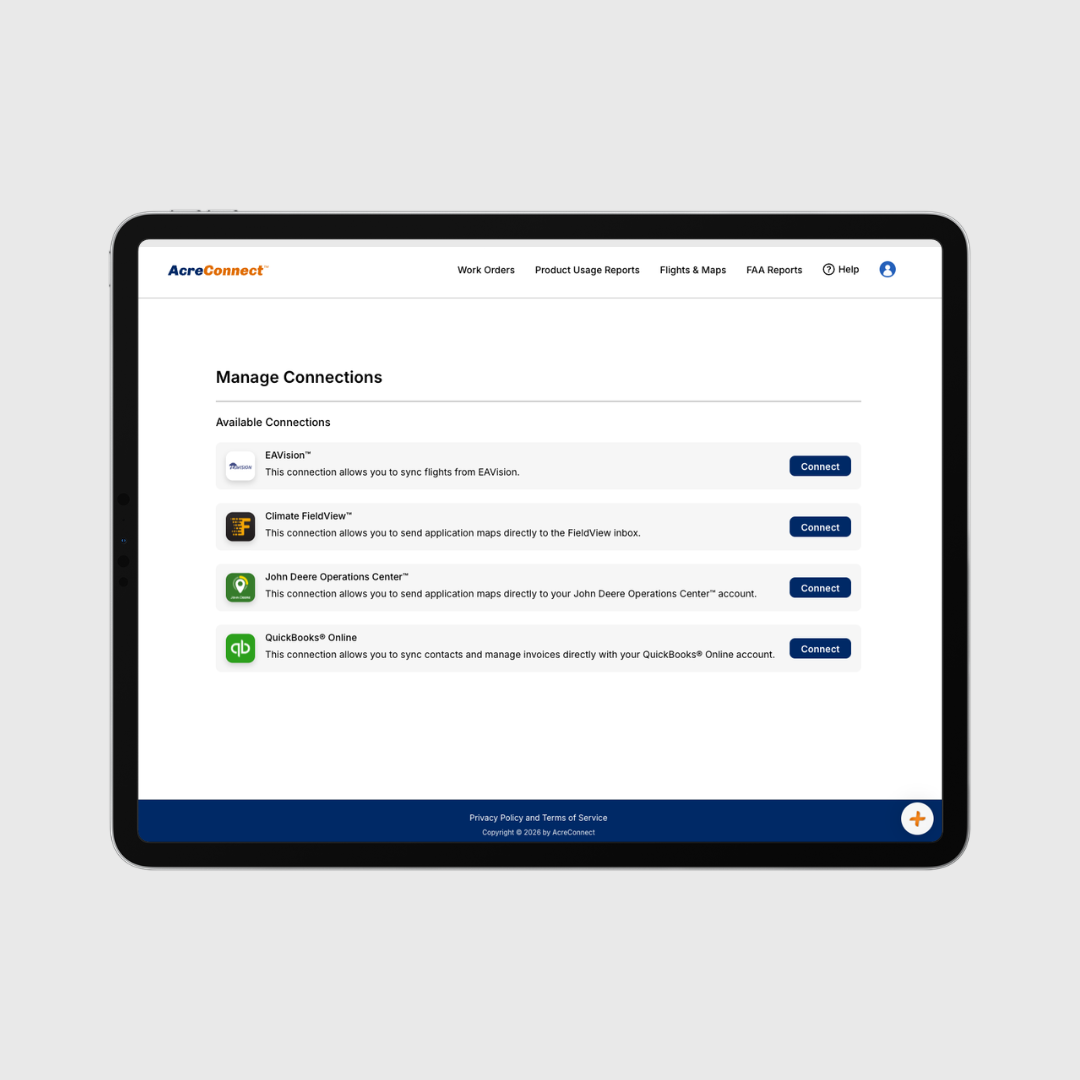
to QuickBooks®, John Deere Operations Center™, and Climate FieldView™. Generate professional reports, application maps, invoices, and estimates with just a few clicks.
5. How can I import customer data? Do I have to re-enter everything?
Why it matters: Manual data entry is time-consuming and error prone. Look for software that syncs with your existing systems.
What to look for:
- Integration with accounting or CRM tools
- Bulk import options
- Data syncing features
How AcreConnect® helps: AcreConnect® integrates with QuickBooks®, allowing you to import and sync customer data automatically—no double entry required.
6. How do I ensure that chemicals are accurately reported? Do I have to enter that information myself?
Why it matters: Accurate chemical reporting is essential for compliance and safety. Manual entry increases the risk of errors.
What to look for:
- Integration with chemical databases
- Autofill or lookup features
- Built-in compliance tools
How AcreConnect®
helps: We integrate with the Telus® Ag chemical database, giving you access to a vast library of product labels. Just search for and select the product(s) you’re using—no manual entry required.
7. How are FAA reports generated? What drones does this work with? How long does it take?
Why it matters: FAA reporting is mandatory for drones over 55 lbs. The process should be automated and accurate to save time and reduce errors.
What to look for:
- FAA-compliant reporting tools
- Drone log integration
- Time-saving automation
How AcreConnect® helps: AcreConnect® generates FAA-compliant reports for DJI, XAG, EAVision and Exedy drones. Customers report reducing reporting time by 75%—from hours to minutes.
8. How can I create an application map to prove where I applied?
Why it matters: Application maps are often required by growers and retailers. They also help you demonstrate coverage and compliance.
What to look for:
- Application map generation
- Integration with farm management systems
- Export options (PDF, image, etc.)
How AcreConnect® helps: We’re the only platform offering application maps for DJI, XAG, EAVision and Exedy drones. AcreConnect® integrates with John Deere Operations Center™ and Climate FieldView™ to share application maps with your customers directly, and lets you export maps as PDFs.
9. How can I see the software and try it before I buy it?
Why it matters: You should be able to explore features, test usability, and ensure the software fits your workflow before committing.
What to look for:
- Free trial period
- Access to tutorials and sample data
- Live demos or walkthroughs
How AcreConnect® helps: We offer a 7-day free trial with sample data, tutorials, and in-app help. Want a personalized walkthrough? Our team is happy to show you how AcreConnect® can support your business with a live demo.
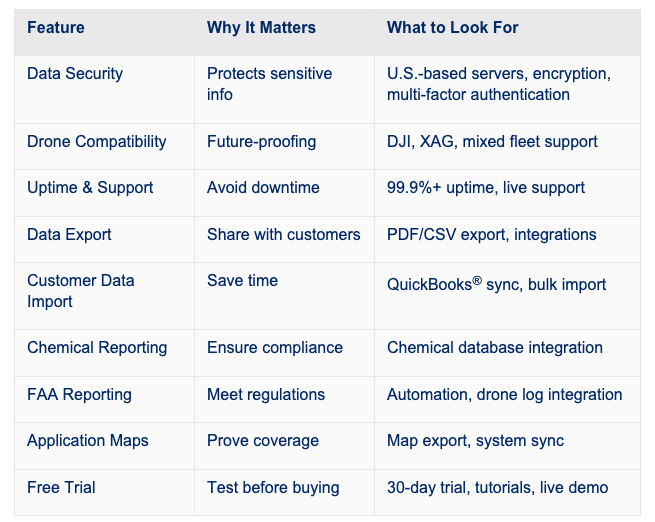
Your Spray Drone Software Evaluation Checklist:
share this
past blog posts
Related blogs